
5 Best Mobile Apps to Find Part-Time Jobs in Your Area

Earning extra income while studying or in your free time has become essential in the current situation. However, many people struggle to find the right part-time job.

In this article, I will share 5 important apps that help you find jobs near your location.

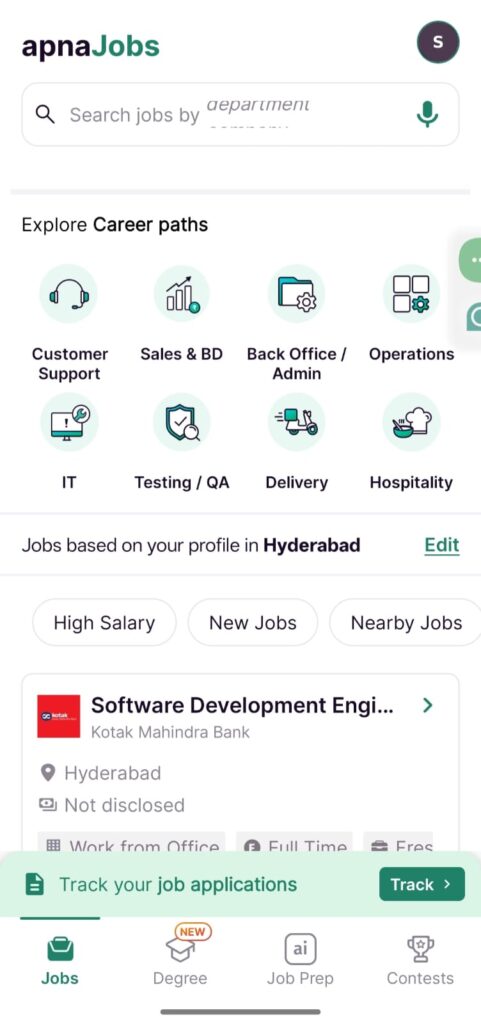
Apna App is a professional platform designed for blue-collar and grey-collar jobs. What I noticed here is that this isn’t just about job searching; it feels like a good community where people like us support each other.

Opportunities are available here for everyone, from delivery boys to data entry operators, from sales executives to office staff.

blue and white modern student abroad facebook ad

How Does It Work?

After logging in with your mobile number, enter your name, education, and skills, and select your preferred job categories. The app automatically creates a professional card for you based on the details you provide. This works like your resume.

Actually, preparing my resume on my own always felt difficult to me, but here it became very easy. The app shows jobs near your location when you set your current city or area.
whatsapp image 2026 03 27 at 22.28.04

Main Job Categories Available in Apna App

There are more than 70 categories. These are very useful for those looking for part-time jobs:

  • Data entry & back office for those with computer knowledge.
  • Telecalling & BPO for those with good communication skills.
  • Delivery & Driving: for those who have a bike or vehicle.
  • Retail & Sales is working in shopping malls or stores.
  • Teaching & Tutoring for teaching students.

WorkIndia

After Apna App, the next most popular app in India for blue-collar and grey-collar jobs is WorkIndia.
Even if you have less education or no prior experience, WorkIndia is an excellent platform for finding a job near your location. Near our house, someone was struggling to find a job. When I showed this app to him, he got a driving job that he already knew very easily. This app primarily prioritizes those looking for basic jobs.
Many job portals are limited only to software or high-profile jobs. However, in the WorkIndia app, there are thousands of ground-level jobs, including driver, packer, office boy, telecaller, and security guard roles.
You do not need to pay even a single rupee to use this app or apply for jobs. The best thing I noticed here is that, as soon as we click on the job we like, the company’s HR number is shown directly.
When you find a job you like, the company’s HR number appears, so you can call and confirm the interview timing.
It filters and shows jobs within 5 kilometres of your area. Actually, this helps a lot because instead of going far away to do a job, getting work near our home is happy, right?
Based on the details you provide in the app, an automatic profile is created. There is less need to carry separate paper resumes.

What kind of jobs are available?

There are jobs in more than 50 categories in this app, including:
Back Office & Data Entry
Delivery Boy & Bike Rider
Cook, Waiter & Hotel Staff
Beautician & Salon Staff
Teachers & Tutors
Receptionist & Accountant

How to use the app?

Download the app from the Play Store and register with your mobile number. Enter your name, age, education, and select the languages you know. You are given a job you like and enter your area pin code.
If you see a job posting you like, press the “Call HR” button to speak directly with the HR representative.

Safety and Precautions

Although the WorkIndia app uses AI filters to reduce fraudulent jobs, users should take these precautions:
If they ask for money, say no: If anyone asks for a “registration fee” or “uniform fee,” understand that it is fraud.
Before going to an interview, search the company name on Google once.
Be careful when visiting unfamiliar or isolated locations for interviews.
For quick, part-time or full-time jobs in your area at no cost, WorkIndia is useful for freshers.

Indeed

Indeed is not just for local jobs; it is a well-known, worldwide platform. For those who want to search for jobs professionally and in a structured way, this is the best choice.
If you are looking for part-time jobs like data entry, content writing, graphic design, or any office-related work, or for digital marketing jobs, I mostly use Indeed. Indeed is like a big information hub. It collects job notifications from thousands of company websites and displays them in one place.

Important Features in Indeed

You can check what salary is offered for a job before applying. I used to check beforehand because if they tell you a low salary after the interview, it would be a waste of time. This is not clearly available in other apps. Before joining a company, you can read ratings and reviews given by employees working there. Actually, by reading these reviews, we get clarity beforehand about what the company’s environment will be like. This helps you understand whether the company is good or not.
You can clearly filter for “Work from home” or “Part-time”.

How should your profile be?

You can upload your resume as a PDF or create one using the template provided in the app. If you clearly mention your skills (for example, typing, video editing, and Photoshop), companies will come searching for you.

How to search for jobs?

“Part-time jobs in [your city name].”
“Work from home jobs”
“Student part-time jobs”
By searching like this, you will get more accurate results.

Plus & Minus Points

Job listings are mostly genuine. Big companies also post here.
Unlike Apna App, there is no direct HR call option for all jobs. After you apply, they will contact you via email or phone, so be patient. That means you need some patience.
Things to be careful about
As mentioned earlier, there can be some fake postings here, too.
If they ask for even one rupee in advance, saying they will provide a laptop or training, flag it as a scam. Try replying via Indeed in-app messaging. If they ask for your personal WhatsApp number, be cautious.
If you are seriously looking for a good-paying part-time job, definitely create a profile on Indeed. If you get local jobs on Apna App, you can also get professional jobs on Indeed.

LinkedIn

LinkedIn is not like other job apps; it is a professional networking site. That means it is like Facebook, but used only for career and business purposes.
If you want professional part-time jobs or freelance work, this is the best option.
If you are looking for skill-based part-time work, such as content writing, graphic design, marketing, or similar roles, there is no better platform than LinkedIn. Here, not only can you search for jobs, but you can also directly build connections with managers of big companies.

Profile Building

You should upload a clear photo of your face.
Write what you can do here. For example: “Freelance Content Writer” or “B.Tech Student looking for Part-time Design roles”.
If you have any prior experience, you can add it here.

How to search for jobs?

There is a separate section called “Jobs”.
In the search bar, type “Part-time”, and in location, choose “Remote” (work from home) or your city name.
Some jobs have an “Easy Apply” button. If you click it, your LinkedIn profile will go directly to the company.

Networking (Building Connections)

The best thing about LinkedIn is that you can send a “Connection Request” to employees or HR in the company where you want to work. Actually, if I wanted to message directly, I used to feel a bit scared at first. But if we ask properly, they also help.
You can talk to them professionally and ask, “I am looking for part-time work like this. Are there any openings in your company?” This is called Direct Outreach.

Plus & Minus Points

Joblisted re are of high quality. The salary is also good. The chances of scams are very low.
Profile maintenance is a bit difficult. You may not get an immediate reply after applying because the competition is high. If we don’t get a reply immediately after applying, there’s no need to worry. The competition here is a bit high, so we have to wait a little patiently.

Some Important Precautions

Sometimes messages may come from fake profiles. If they ask you to visit Telegram or to invest, it is definitely fraud.
You can also create posts here. For example, if you post a design you made, someone might see it and offer to work on it.
LinkedIn is not just for jobs; it is useful for building your professional brand. It is a must for students and for those who want to build their careers.

Google for Jobs:

Till now, we have discussed some specific apps. Now let’s see how to search for jobs directly through Google without installing any app. This is called Google for Jobs.
Actually, this is not a separate app, but a special feature inside the Google search engine.
Just like you search for anything on Google, you can also search for jobs. What Google does is scan thousands of job boards on the internet (LinkedIn, Indeed, Quikr, Glassdoor) and show the jobs you need in one place.
You need to go to the Google search bar and type like this:
“Part-time jobs near me”
“Data entry jobs in [your area name]”
“Work from home jobs for students”
When you search like this, you will see a blue box called “Jobs.” If you click on it, a large window will open.
Special Features
You can filter jobs as per your needs. You can set it. Do you want a job within 2 kilometres? Or only jobs posted in the last 3 days? You can set it.
If you like a job, you can save it and apply later.
If you turn on “New Job Alerts,” Google will send you emails whenever a new job is posted in your category.
How does the application process work?
Google does not directly provide jobs. It takes you to the website where the job is posted.
For example, if a job is on LinkedIn, when you click that job in Google, it will take you to the LinkedIn website. There, you have to apply.
Advantages & Disadvantages
Advantage: You can see jobs from all apps in one place on Google. It saves a lot of time. Also, phone memory is not wasted.
Disadvantage: Sometimes old (expired) jobs may appear in Google. Also, Google may show jobs from fraudulent websites, so be careful.
Things to be careful about
While searching on Google, remember these two things:
While searching on Google, remember these two things: see which website the job is coming from (for example, LinkedIn or Indeed) to ensure it’s trustworthy. If it is from an unknown new website, do some research.
No matter which website you go to from Google, if they ask you for money, immediately come back.
If you don’t like installing many apps on your phone, Google for Jobs is like a blessing. It is the best option to see all types of opportunities at once.

Similar Posts

Leave a Reply

Your email address will not be published. Required fields are marked *